
TelCOMM users manual
GS2TelCOMM users manual

TelCOMM software is a tool designed for B2B exchange of documents using AS4 protocol, the implementation of which at gas counterparties market results from the European Commission Regulation (EU) 2015/703 from 30 April 2015 which establishes a network code, being a principle of interoperability and data exchange.
Introduction
AS4 Protocol (Applicability Statement 4) is a standard that describes secure and reliable sending of messages over Internet public network. This protocol is based on well-known and acknowledged solutions, such as protocols HTTP, TLS, SOAP and web services. It represents an open standard for B2B data exchange described in OASIS ebMS 3.0 specification. The elements responsible for security and reliability of transmitted data are digital signatures and encrypting mechanisms (WS-security).
Architecture
TelCOMM software is a solution addressed for MS Windows Server, based on subsystem IIS and .NET Framework 4.8 or newer. Interaction with the program is done via HTTPS and the version of used TLS protocol for message sending is 1.2 or 1.3. TelCOMM has an embedded SQLite database or it can use Oracle database.
Software consists of three components:
- web interface accessible from web browser, that allows configuration and interactive exchange of documents,
- web service /WebServices/Gateway.asmx, that allows exchange of documents initiated from external program,
- web service /MSH.asmx/Receive, that allows reception of documents from partners.
Web interface
The main screen of program provides functionality of sending documents using AS4 One-Way/Push MEP (message exchange pattern) using defined P-Mode (Processing Mode).
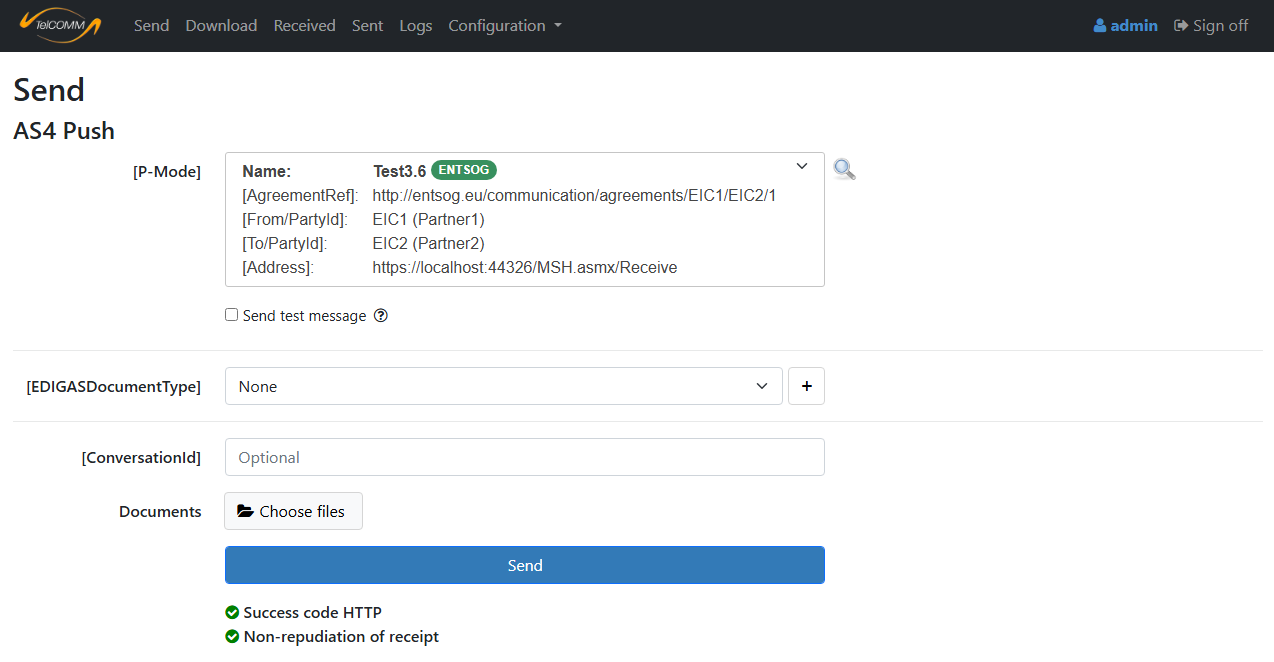
Figure 1. Screen "Send" - after response analysis
Second screen is for downloading data from partner with AS4 Two-Way/Push-Pull, Two-Way/Sync or One-Way/Pull MEP.
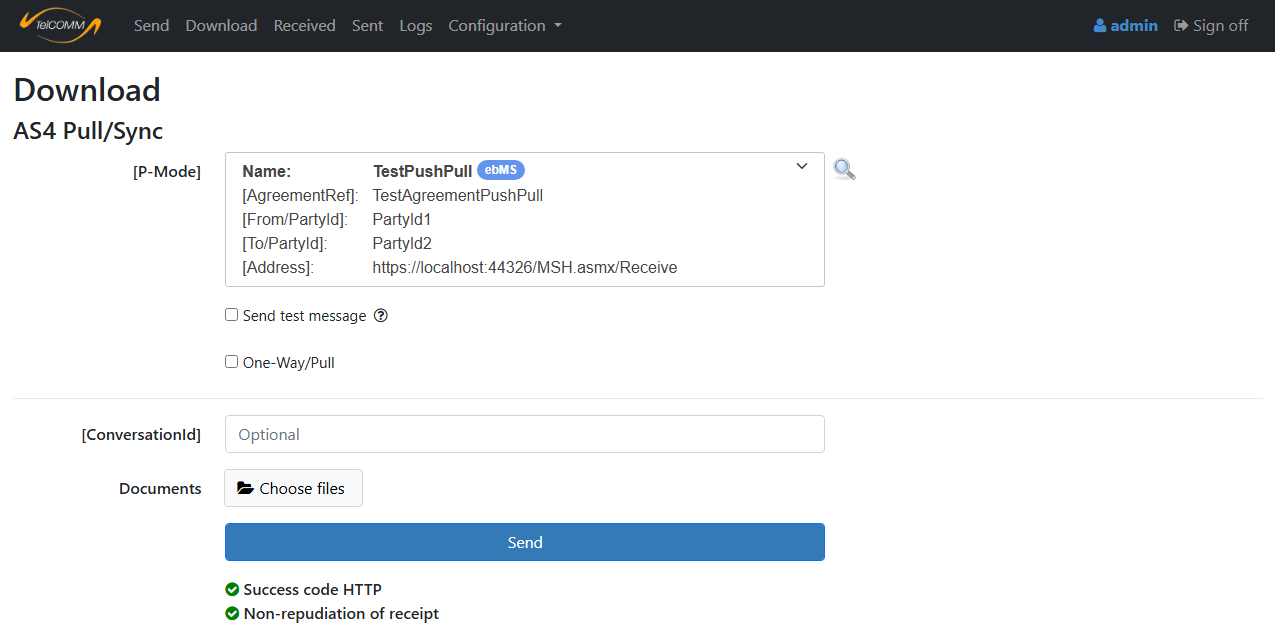
Figure 2. Screen "Download" - after response analysis
Web interface includes received and sent messages screens, allowing viewing and managing of every received and sent message.
Administrators have access to additional screens:
- Logs – AS4 communication errors and users activity information,
- Partners – friendly name for partner,
- Processing Modes (P-Modes) – configuring AS4 communication between partners,
- Users,
- Database – choosing SQLite or Oracle,
- Options.
User interface is available in Polish and English.
Interface for external application
TelCOMM software can act as an gateway for B2B communication, through which another application can automatically send and receive AS4 messages, because it provides its functionalities in web service /WebServices/Gateway.asmx.
Gateway.asmx example methods:
- SendByPModeName,
- GetUnreadPushMessagesIds,
- GetMessages,
- MarkAsRead.
Receiving messages from partner
The relative address of method that is used as a reception point for all incoming AS4 messages is /MSH.asmx/Receive.
Communication configuration
AS4 communication between partners is configured by defining a P-Mode (Processing Mode).
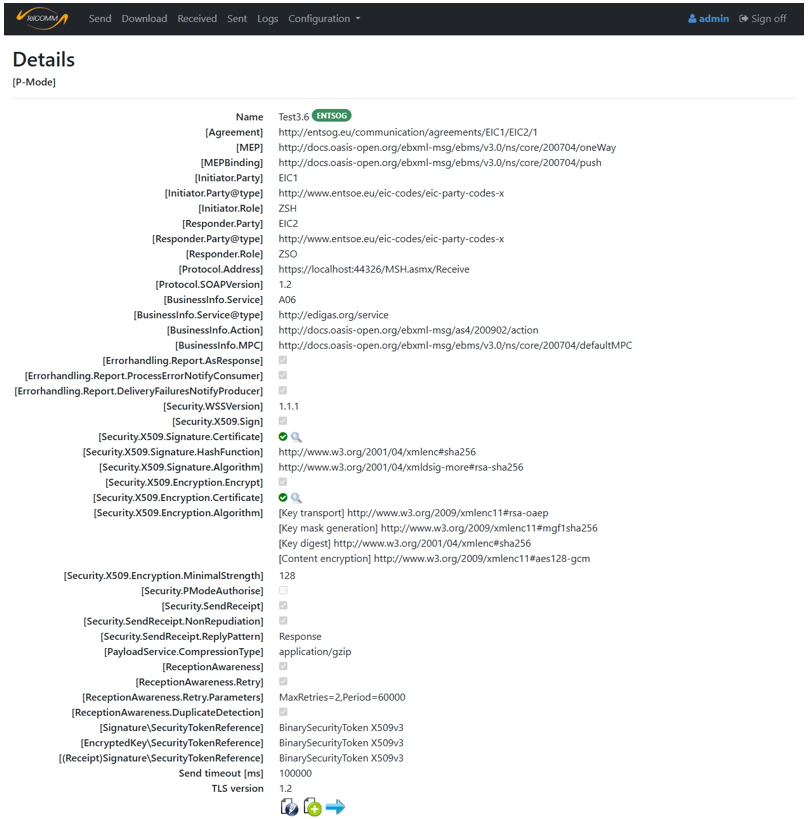
Figure 3. Screen [P-Mode] details
Automatic update of certificates
Automatic update of certificates is a required module of an AS4 software operating on European gas market. Its aim is to automate the process of updating used by partners certificates to newer ones, usually in situation of approaching certificate expiration date.
Specification
- AS4 profiles: ENTSOG 3.6, ENTSOG 4.0, BDEW
- Message Exchange Patterns (MEP):
- Initiating and responding: One-Way/Push, Two-Way/Push-Pull
- Only initiating: One-Way/Pull, Two-Way/Sync
- Algorithms:
- Digest methods (hash): sha1, sha256, sha384, sha512
- Digital signature:
- RSA certificate : rsa-sha256, rsa-sha384, rsa-sha512
- ECC certificate: ecdsa-sha256, ecdsa-sha384, ecdsa-sha512
- Ed25519 certificate: eddsa-ed25519
- Data encryption:
- aes128-cbc, aes192-cbc, aes256-cbc
- aes128-gcm, aes192-gcm, aes256-gcm
- Key encryption:
- [key transport] RSA certificate: rsa-oaep-mgf1p, rsa-oaep
- MGF: mgf1sha1, mgf1sha256, mgf1sha384, mgf1sha512
- Digest methods (hash): sha1, sha256, sha384, sha512
- [key agreement] ECC certificate: ECDH-ES, X25519 certificate: x25519
- KDF: ConcatKDF, hkdf
- KW: kw-aes128, kw-aes192, kw-aes256
- HMAC: sha1, sha256, sha384, sha512
- Compression: gzip
- [ReplyPattern]: Response (synchronous), Callback (asynchronous)
- [SecurityTokenReference]: BinarySecurityToken X509v3, BinarySecurityToken X509PKIPathv1, IssuerAndSerialNumber, SubjectKeyIdentifier
- [ebCore Agreement Update]: yes, for certificates
- Multiple attachments in message: yes
- One [P-Mode] for both directions (when both partners use same certificate for signing and encryption): yes
- Certificates validation: OCSP/CRL (optional)
- Server and client TLS certificate: yes (optional)
- Architecture: Microsoft Windows Server, IIS, .NET Framework 4.8, HTTPS, TLS 1.2 and 1.3
- Database: SQLite, Oracle
- Interaction with program: web browser for users, web service for external programs
- Integration with Microsoft Defender: yes (optional)
- Language in user interface: Polish, English.
GS2TelCOMM plugin
GGS2TelCOMM is an optional extension to TelCOMM software supporting the process of downloading measurement and aggregated data, shared by Gaz-System using AS4 protocol with the use of message exchange pattern Two-Way/Push-Pull or alternatively Two-Way/Sync.
Architecture of GS2TelCOMM is the same as of TelCOMM, it also has an own embedded SQLite database or it can use Oracle database. Plugin supports in the field of generating data requests and analyzing responses specific for Gaz-System, also in automatic and cyclical downloading of data by defining downloading schedules. Obtained data can be viewed on one of the screens or it can be downloaded from web service. In case of installing the extension, in TelCOMM’s navigation bar there will appear position “Gaz-System”.
Source materials:
- [ENTSOG] AS4 Profile version 3.6
- [ENTSOG] AS4 Profile version 4.0
- [BDEW] AS4 Profil
- [BDEW] Regelungen zum Übertragungsweg für AS4
- [OASIS] AS4 Profile of ebMS 3.0 Version 1.0
- [OASIS] ebCore Agreement Update Specification Version 1.0
- [GAZ-SYSTEM] Instrukcja w zakresie wymiany danych protokołem AS4
- [GAZ-SYSTEM] Techniczny opis rozwiązania dla wymiany komunikatów Edig@s z wykorzystaniem standardu AS4
- [GAZ-SYSTEM] Techniczny opis rozwiązania dla udostępniania danych pomiarowych i zagregowanych z wykorzystaniem standardu AS4